Roomio’s custom floor plan options allow you to tailor your deliverables to your specific needs. From branding and layout to unit measurements, we ensure you receive exactly what you and your clients require.
You can now create and save custom template designs directly to your Roomio account.
Upload Your Own: Have a specific style you already use? Upload your existing custom designs, and our team will replicate them for all your future orders.
Modify Defaults: Choose from our existing default styles and add your specific instructions, logos, and layout preferences to build your "signature" look.
Automatic Saving: All created templates are automatically saved to your account. The next time you scan, they’re ready and waiting. Less time faffing, more time scanning!
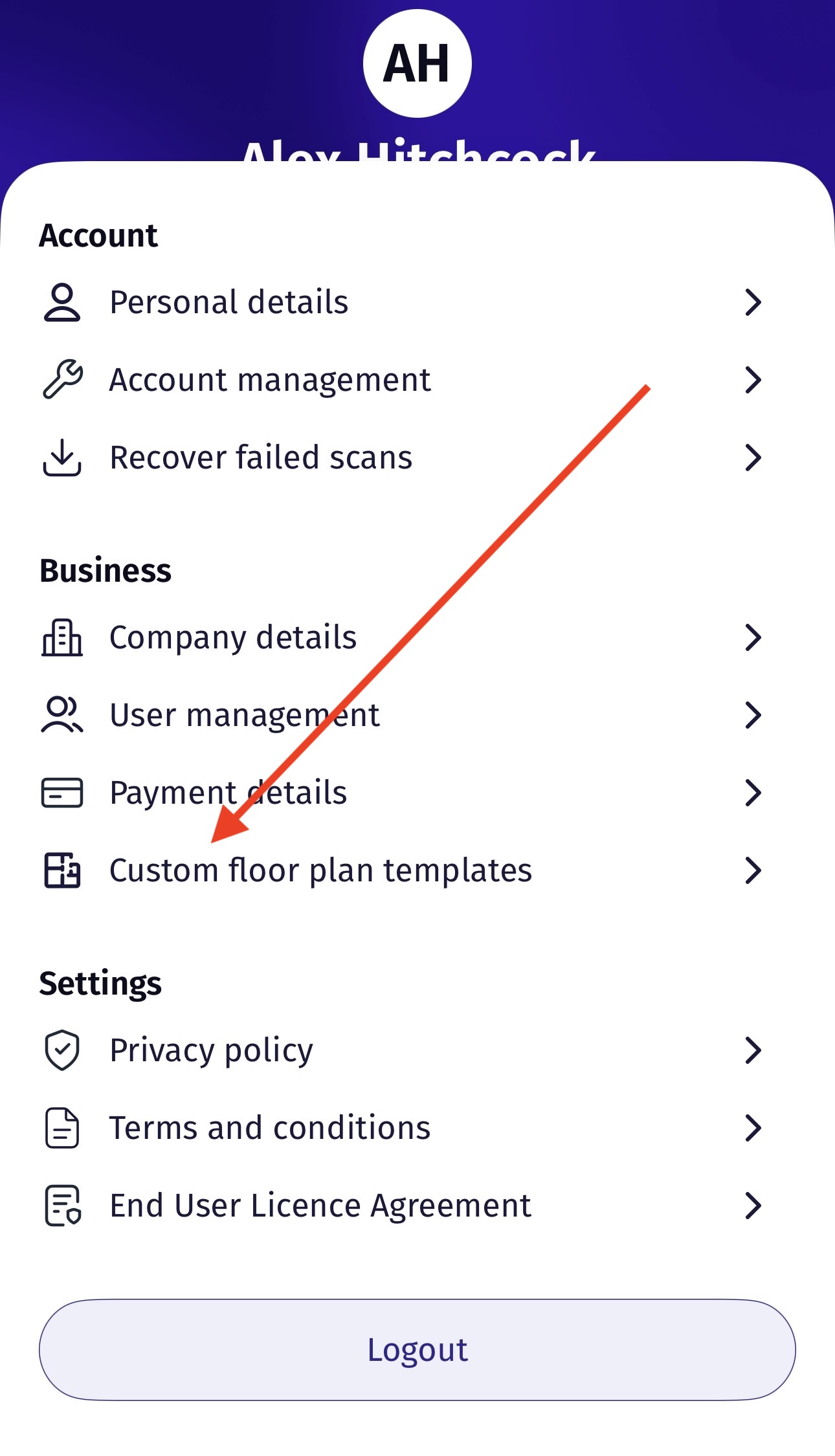
How to get started: Navigate to your Account Settings in the Roomio app and select 'Custom floor plan templates'.
Pro Tip: Please avoid placing an 'Express' order for a template you have just recently created or uploaded. It may take a little extra time to deliver the first order using a brand-new template.
1. Choose Your Template Style
If you aren't using a custom-built template, you can choose from our high-quality standard options:
2D Templates: Clear, professional schematic designs perfect for traditional property listings.
3D Templates: For a more immersive perspective, our 3D templates provide a textured representation of the space, offering a great sense of depth and scale.
Site Plans: Within any template option, you can choose to include a site plan at no extra cost. This shows the property boundaries and the building's footprint on the lot.
2. Add Your Personal Touch
Tailor your floor plan to match your brand identity:
Upload a Logo: Add your branding directly to the final deliverable to maintain a professional look across all documents.
Select a Floor Plan Title: While we default to the property address, you can choose a custom title to label the deliverable however you see fit.
3. Select Your Measurements
Choose the output that best serves your local market:
Metric: Displays measurements in meters (m).
Imperial: Displays measurements in feet and inches (ft/in).
Both: A combined option for maximum clarity.
4. Provide Additional Notes and Documents
Use this section to give our team specific instructions to fine-tune your floor plan:
Additional Notes: Request specific changes, such as renaming a "bedroom" to an "office" or highlighting specific layout features.
Supporting Documents: Upload files to help our team get it right the first time, including:
Annotated files with specific measurement marks.
Drone images for boundary clarity on site plans.
Architectural plans to be used as a reference.
With Roomio’s customization suite, you can ensure every floor plan is perfectly tailored to suit your business and your clients' expectations.
Was this article helpful?
That’s Great!
Thank you for your feedback
Sorry! We couldn't be helpful
Thank you for your feedback
Feedback sent
We appreciate your effort and will try to fix the article